Configure your Network for Luxedo CourtsUpdated 7 months ago
Configuring your Network Guide for Luxedo Courts
The Luxedo Projection System is made up of an array of networked micro-computers, each controlling one projector. It is the micro-computers that are connected to the network, NOT the projectors.
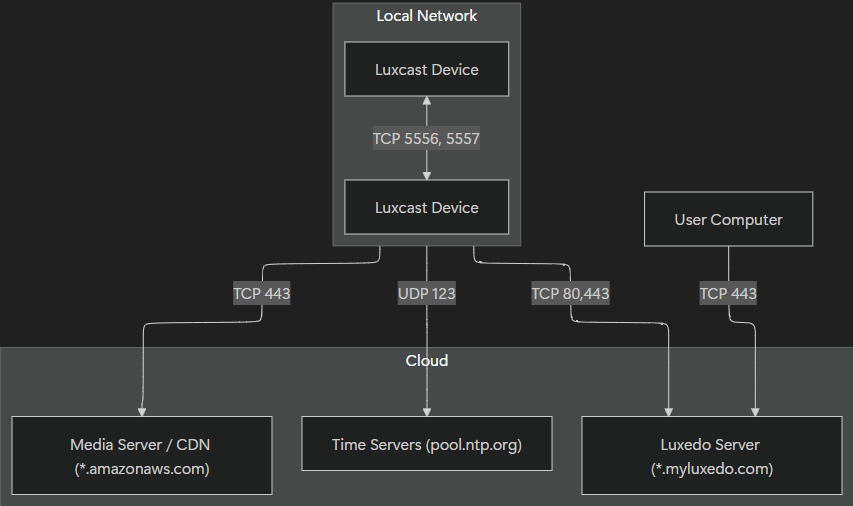
Each device requires outbound internet access so that they can update, download videos to play, receive commands from the user via our servers, and synchronize their clocks to a reliable source. The devices also communicate with each other over the network in order to be able to play video in sync.
Preferred Configuration
This configuration ensures uninterrupted operation as our infrastructure evolves, including changes to regional API endpoints, CDN addresses, and mirror URLs.
If these configurations are too broad, refer to the Least-Privilege Configurations section below.
| Direction | Source | Destination | Protocol | Ports | Purpose |
|---|---|---|---|---|---|
| Outbound | Luxedo Devices | Any (0.0.0.0/0) | TCP | 80 | Firmware update packages |
| Outbound | Luxedo Devices | Any (0.0.0.0/0) | TCP | 443 | Device API & Updates + CDN / Media Servers |
| Outbound | Luxedo Devices | Any (0.0.0.0/0) | UDP | 123 | Time servers - critical for device playback to stay in sync |
| Both | Luxedo Devices | Luxedo Devices | TCP | * | (LAN Only) Multi-device co-ordination & synchronization |
Least-Privilege Configurations
These represent minimal configuration for the system to work at present, separated by port and protocol. For guaranteed long-term stability without needing network changes, we recommend using the Preferred Configuration as a default, and only applying the least-privilege rules necessary for compliance.
‼️Important‼️: Wildcard entries (e.g. *.myluxedo.com) cover all subdomains at any depth. If your firewall platform does not support wildcard FQDN matching, please contact us for a full explicit domain list.
Egress: TCP Port 80 → Internet
| Direction | Destination | Port | Purpose |
|---|---|---|---|
| OUT | apt.myluxedo.com | 80 | Firmware updates |
| OUT | *.apt.myluxedo.com | 80 | Firmware updates |
Egress: TCP Port 443 → Internet
| Direction | Destination | Port | Purpose |
|---|---|---|---|
| OUT | *.myluxedo.com | 443 | Firmware updates + device API |
| OUT | *.amazonaws.com | 443 | Luxedo Media Server / CDN |
| OUT | *.luxedo.app | 443 | Device API mirror |
| OUT | *.luxe.do | 443 | Device API mirror |
Egress: UDP Port 123 → Internet
| Direction | Destination | Port | Purpose |
|---|---|---|---|
| OUT | pool.ntp.org | 123 | Device Clock Synchronization |
| OUT | debian.pool.ntp.org | 123 | Device Clock Synchronization |
| OUT | *.debian.pool.ntp.org | 123 | Device Clock Synchronization |
Ingress: TCP Ports 5556-5557 → Local
Note: Though this configuration will work, we highly recommend you allow bi-directional communication between devices on all ports, as we will be making changes to the local device communication patterns and relying on more ports for redundancy.
| Direction | Source | Destination | Port | Purpose |
|---|---|---|---|---|
| IN | Luxedo Device | Luxedo Device | 5556 | Real-time Synchronization & Communication |
| IN | Luxedo Device | Luxedo Device | 5557 | Real-time Synchronization & Communication |
Once these network configurations are in place, your Luxedo Court system will be fully prepared for smooth operation. If you have questions or would like assistance validating your setup, our support team is available to help.
Network Diagram