
Configure your Audio DeviceUpdated 8 months ago
Each and every court system has its own A/V system, and Luxedo has a solution that allows our projection systems to seamlessly integrate into any audio system: The audio device. On the day of your installation, Luxedo's team will handoff the audio device to a member of your team, alongside instructions on how to set them up. In this guide, we review how to set the system up.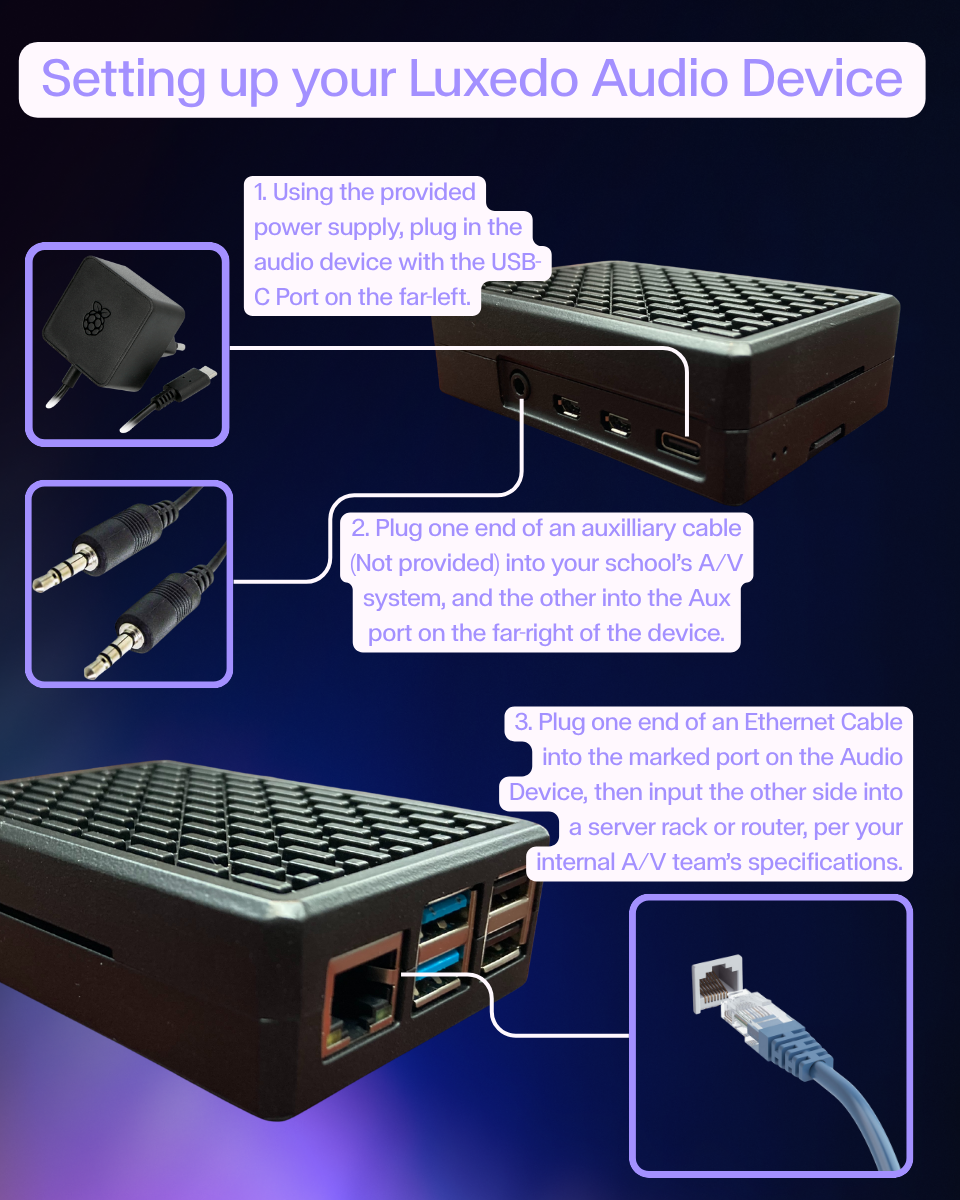 One-Page Audio Device Guide
Your audio device will have three different plugs: Ethernet, Power, and 3.5mm aux. Each one of these will need to be routed to the system so that it can easily be added to your A/V setup. The power supply will be provided by the installation team, but it is the responsibility of the school to provide the ethernet connection and the 3.5 mm aux chord.
Once powered on, connected via ethernet, and hooked up to the audio system, you will need to configure the network just as you would the other Luxedo systems, so please verify that all of the required ports are open.
With all of that set up, you should be set up and ready to go. If the system is not registered to your group, or audio is not playing, please contact [email protected]